Front desk
Display branded cards where customers check in or check out. Follow the campaign requirements and submit placement proof for review.
Cards & Flyers
Connect brands with businesses for paid front-desk displays, handouts, and package inserts. Personalized physical cards turn each approved placement into a QR link and discount code customers can use in your store.
Paid participation and Stripe Connect payouts are for eligible US businesses and US placements only. Campaign terms and approval apply. No guaranteed earnings, sales, or endorsements.
Watch the product tour, including the brand campaign dashboard and business partner portal. Follow personalized offers from placement to proof, attribution, and earnings.
Fictional demo data, not actual results. Printing, shipping, and campaign compensation are separate from the subscription. Approval, funding, holds, refunds, and eligibility checks apply; no guaranteed sales or earnings. Provider update: new cards use Cloudprinter; the recorded demo shows the earlier Gelato print workflow. Gelato is retained for separately configured merchandise.
Explore the product screenshots →Brand → Business → Unique QR → Customer → Qualified scan → Discount code → Attributed purchase.
Review active placements, total and qualified scans, attributed store orders, repeat orders, and attributed revenue. Compare campaign spending and eligible business earnings without treating an unverified interaction as a sale.
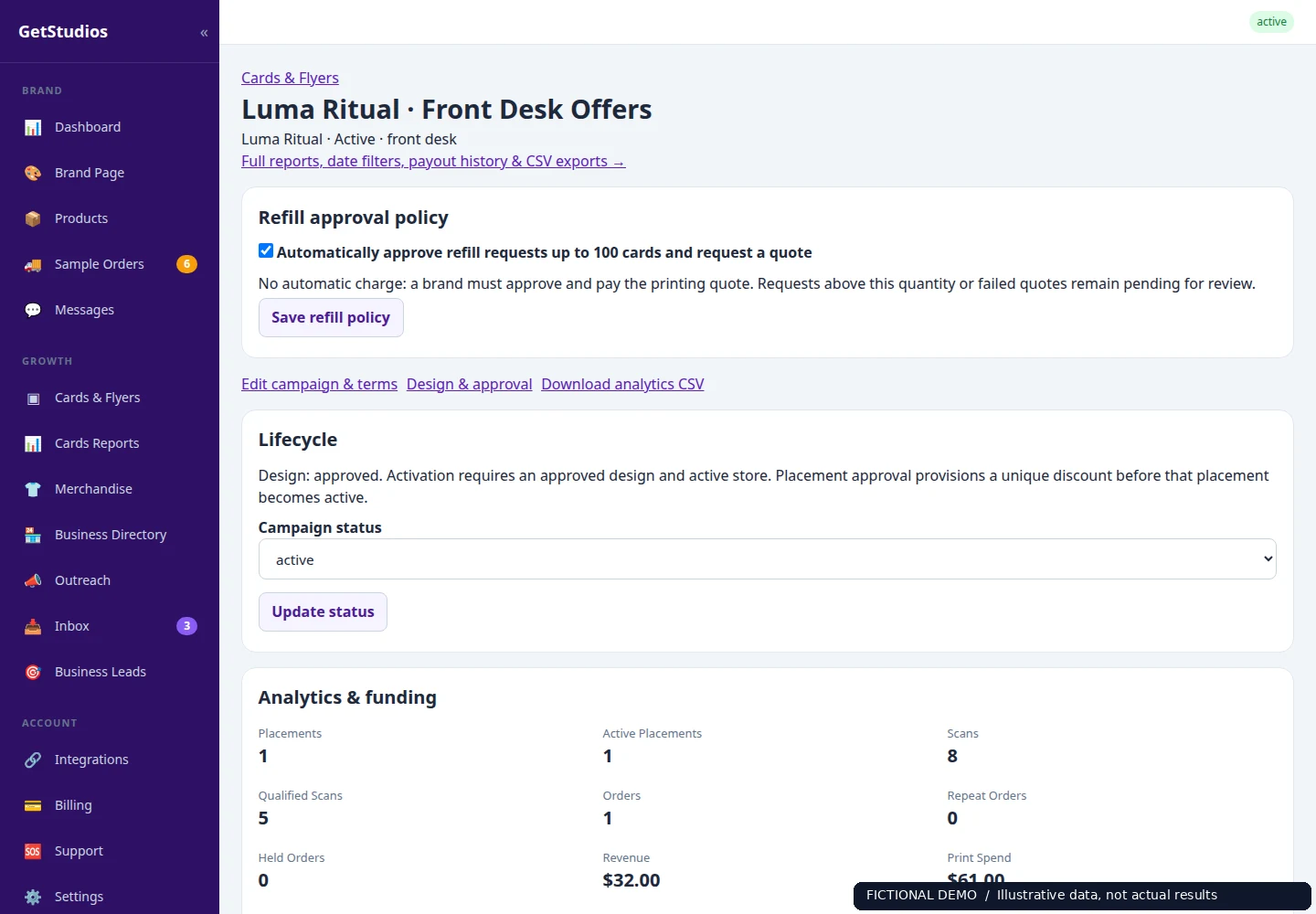
Review placement activity, attributed revenue, campaign funding, and obligations.
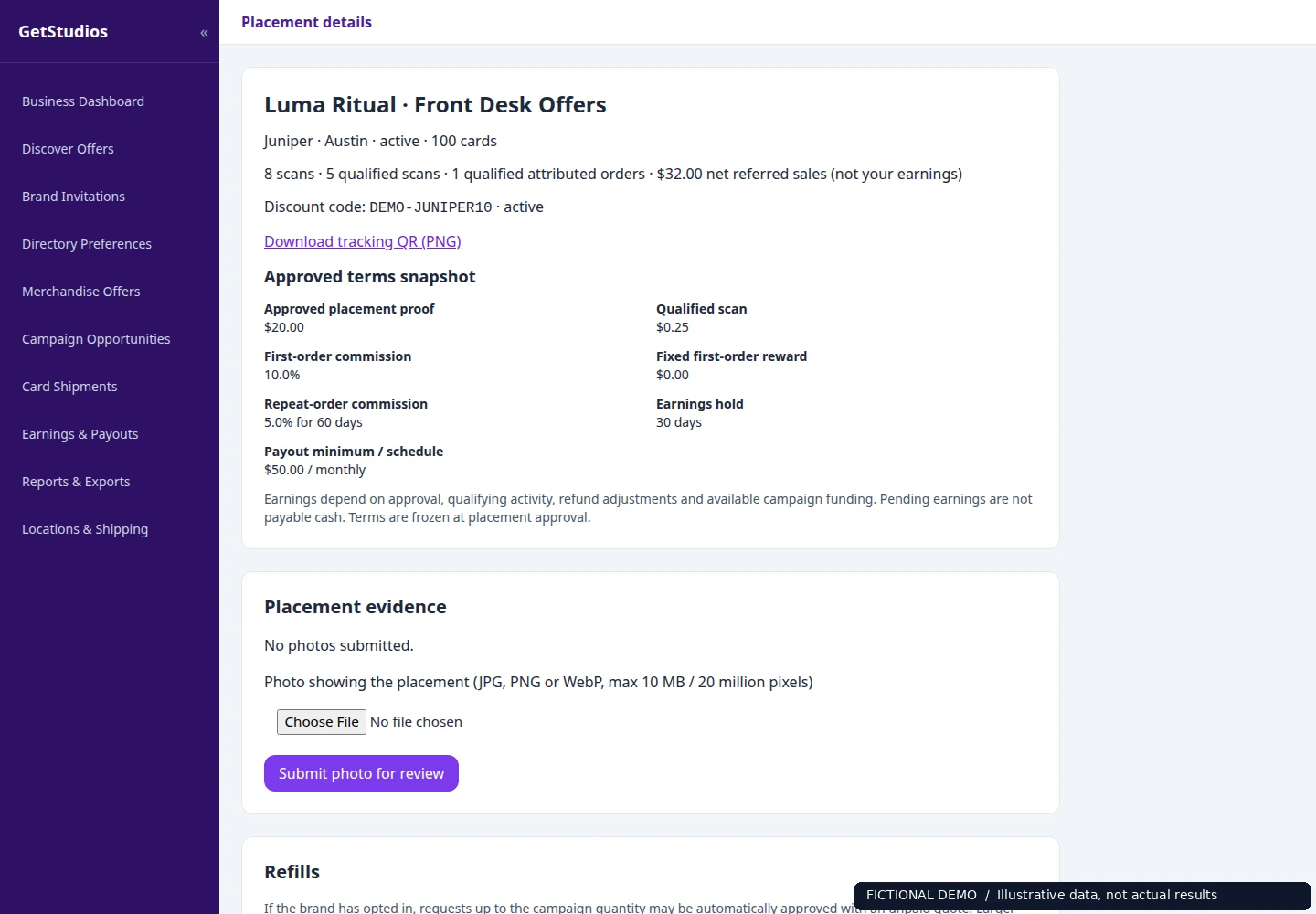
Partners manage placements, submit proof, request refills, and follow their earnings.
Screenshots use fictional data, not customer results. A qualified scan is an anti-abuse classification, not proof of a unique person, a card handed out, or a coupon claimed. Attribution depends on connected-store data and campaign rules; it does not prove incremental sales.
Display branded cards where customers check in or check out. Follow the campaign requirements and submit placement proof for review.
Offer a physical card during a relevant customer interaction. Your business decides which campaigns suit its audience.
Include approved cards in outgoing ecommerce packages. Each participating location has its own QR and discount code for attribution.
Brands connect Shopify or WooCommerce, choose a placement, approve the design, and publish compensation terms. Campaign funding is separate from the subscription.
Businesses browse opportunities from multiple brands and apply with a location. Invite-only brand campaigns remain available only through an invitation. Brands review applications before approval.
Approved placements receive personalized QR and discount codes. Review the printing and shipping quote, including the service markup, before submitting physical cards to Cloudprinter for production and delivery.
Businesses upload placement proof and request refills in their portal. Qualified scans and attributed orders feed campaign earnings; eligible funded payouts use Stripe Connect after required holds and checks.
Cards and flyers use Cloudprinter. Optional Gelato merchandise uses a separate brand-approved offer and payment workflow; only configured products and supported destinations are available.
Brands can combine upfront placement payments, qualified scan payments, a fixed sale commission, and first-order or repeat-order commissions. Businesses see the actual offer before applying. Only the campaign's published terms apply.
Your subscription covers the platform, not placement/media spend. Choose and fund a separate Campaign Budget for placement payments, qualified scans, and commissions. Printing and shipping are quoted separately, including a service markup. Refills are quoted and approved separately too.
See pricing details →Manage applications, placement proof, shipping, refills, and earnings across brands. Complete Stripe Connect onboarding for payouts. Approval, available funds, minimum payouts, hold periods, refunds, and fraud checks determine what can be paid.
Join as a business →GetStudios Platform is $2,999/month for the tools and managed workflows of your local-business distribution network. Placement/media spend is not included. Your brand chooses and separately funds its Campaign Budget for placement payments, qualified scans, and eligible sales commissions. Printing and shipping are separately quoted and paid; setting a budget limit does not load funds.
Brands offer paid advertising placements at front desks, as handouts, or as package inserts. Businesses apply to campaigns from multiple brands. After approval, personalized physical cards with a location-specific QR code and discount code are printed and shipped through Cloudprinter.
Each campaign sets its own terms: an upfront placement payment, a payment per qualified scan, a fixed sale commission, and first-order or repeat-order commissions may be offered. Only the published terms apply; not every scan or order qualifies. Approval, placement proof, fraud checks, refunds, hold periods, minimum payouts, and available campaign funding affect payment.
No. Printing and shipping are quoted separately, including a service markup, before a print order is submitted. Campaign funding for placement payments, qualified scans, and order commissions is also separate from the brand subscription. Refills require a new quote and approval.
Businesses complete Stripe Connect onboarding. Eligible, funded earnings are paid through Stripe Connect according to the campaign's payout schedule, after applicable holds and minimums. A pending earning is not a completed payout.
No. These are paid advertising placements, not paid reviews or required endorsements. Businesses must make appropriate advertising disclosures and follow applicable rules. Healthcare and veterinary participation requires professional review of product suitability, claims, and applicable rules; placement does not imply medical approval or clinical benefit.
Yes. Cards & Flyers is a separate campaign workflow alongside your existing sample offers. Shopify or WooCommerce supplies the connected store and attributed order data. Businesses can review available campaigns, apply for suitable locations, upload placement proof, and request refills.